

Lullventyr
✦✦✦✦
Lullventyr, the friendly dragon storyteller

Personalized audio stories

Bedtime stories,
read in your voice

Beloved fairy tales, told by our AI voices — or by your AI voice. Press play, and once upon a time begins.

Begin the journey

Create your story account
or continue with
Already have an account? Sign in

You'll confirm our Terms and Privacy Policy before you start.

  • Free preview for adults — 5 stories a month, 10 min a day
  • Paid plan — unlimited listening to every story
  • Paid plan — your AI voice for any character
Browse the stories

Find your next bedtime story

Pick a cover to explore the story, its chapters, and a little of how it begins.

See stories

Every story, fully told

No recording needed: every story comes with all of this, on every plan — the free preview included.

  • A voice for every character

    The narrator tells the story, and each character speaks in an AI voice of their own, so you always know who is talking.

  • The mood of every line

    The reading follows the mood of each line: quicker when something exciting happens, slower when it's sad or sleepy, with pauses that let the big moments land.

  • Pictures of every place

    Each chapter is illustrated with the places where it happens — a forest, a castle, a little cottage — and the pictures change as the story moves on.

  • Read along

    The words light up as they are spoken, each speaker appears beside their lines, and music plays in the background.

Paid plan

Your AI voice, for any character

Record one short passage, then choose who reads in your AI voice: just the narrator, a few characters or the whole cast. The others keep their own AI voices, and only the parts in your voice use your plan's monthly rendering time.
How it works

  1. Record one passage

    Read a short passage out loud, about a minute, in a quiet room. You may need to record again for new narration after the recording expires.

  2. Pick a story

    Choose from the library of well-known fairy tales, sorted by genre, origin and storyteller. Every one has a cover, chapters and a read-along text.

  3. Press play at bedtime

    Lullventyr’s AI narrates the story with the characters acted out — in your own voice on a paid plan, within its monthly rendering time. Story mode, also on a paid plan, keeps the screen simple while everyone listens.

A look inside Lullventyr

Real screens from Lullventyr, with the fairy tales Snow White, The Wild Swans and The Snow Queen: how a story plays, who is in it and, on a paid plan, how your AI voice joins the cast.

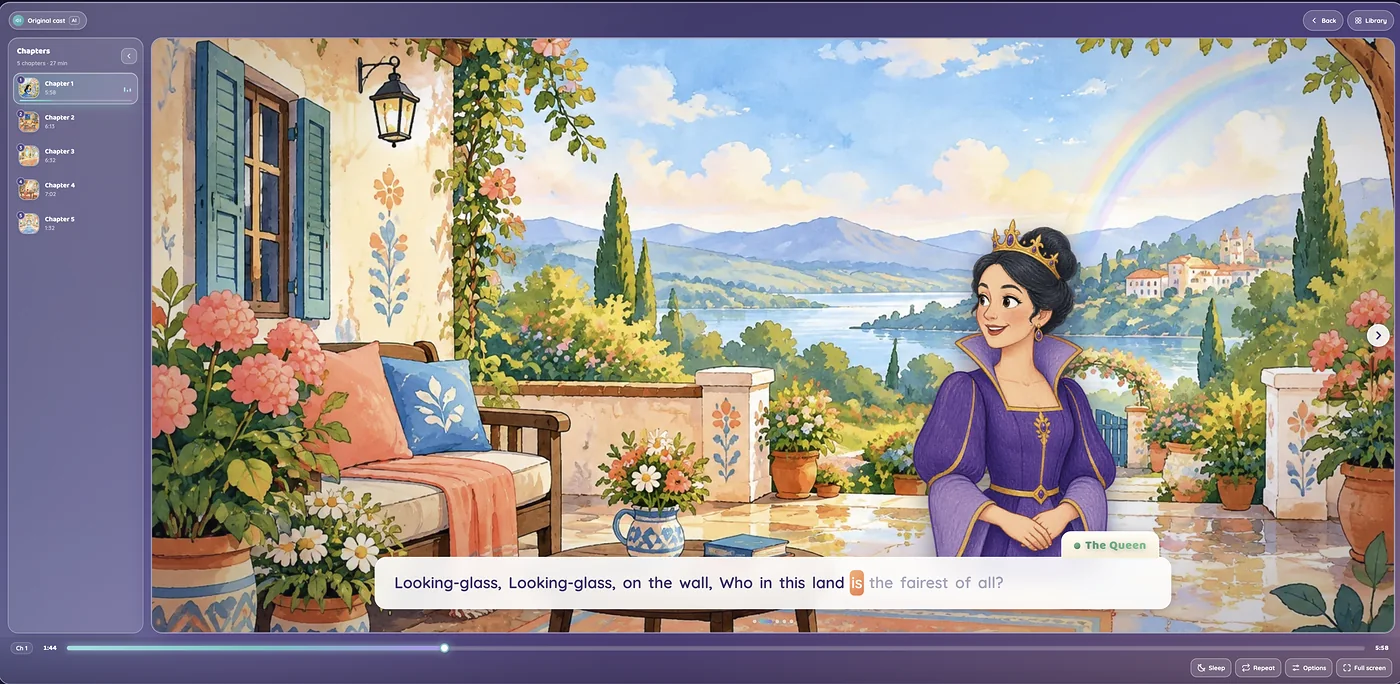
The Lullventyr player in Snow White: a painted terrace above a lake under a rainbow, the Queen beside her line “Looking-glass, Looking-glass, on the wall, Who in this land is the fairest of all?” with the word being read lit up, the chapter list open with chapter 1 playing, and the Sleep, Repeat, Options and Full screen buttons.

Listen, look and read along

Press play and the story fills the screen: every chapter is told over pictures of the places where it happens, and every line shows who is speaking. Here, the first chapter of Snow White, read by its original cast of AI voices.

  1. Who is reading The label at the top names the voices: the original cast of AI voices or, on a story narrated in your AI voice, a switch between the two.
  2. Pictures of every place Each chapter has pictures of its own, and they change as the story moves on.
  3. Who is speaking The character speaking appears beside their line, and every character has an AI voice of their own.
  4. Words that light up Follow along as each word lights up while it is read.
  5. Sleep timer and options Set a sleep timer, put the story on repeat, go full screen, or change the volume, the music, the size of the words and the reading speed.
  6. Every chapter at hand The chapter list gives each chapter’s picture and length, and the one playing shows how far along it is. Tap any chapter to jump to it.
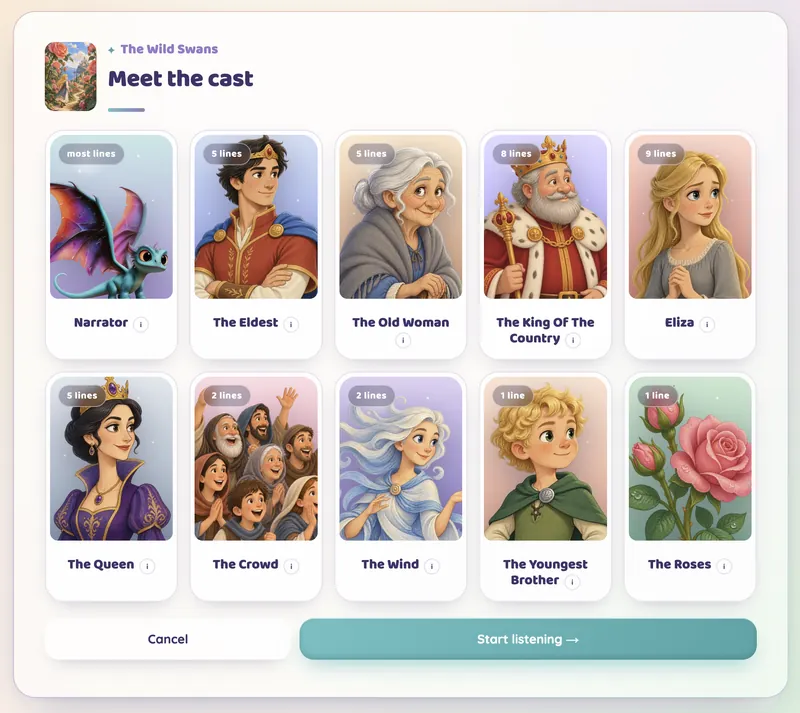
Meet the cast for The Wild Swans: ten character cards, each with a portrait and how many lines they speak, among them the Narrator, Eliza, the Queen, the Wind and the Roses.

Meet the cast before you listen

Before a story first plays in our AI voices, its whole cast lines up, from the narrator to the smallest part, each with a portrait and a voice of their own. Here, the ten voices of The Wild Swans.

  1. A face for every voice Every character has a portrait, so you know who’s who before the story begins.
  2. Who speaks the most Each card counts its character’s lines, and the biggest part is marked most lines.
  3. What each voice is like Tap ⓘ beside a name to read a short description of that character’s voice.
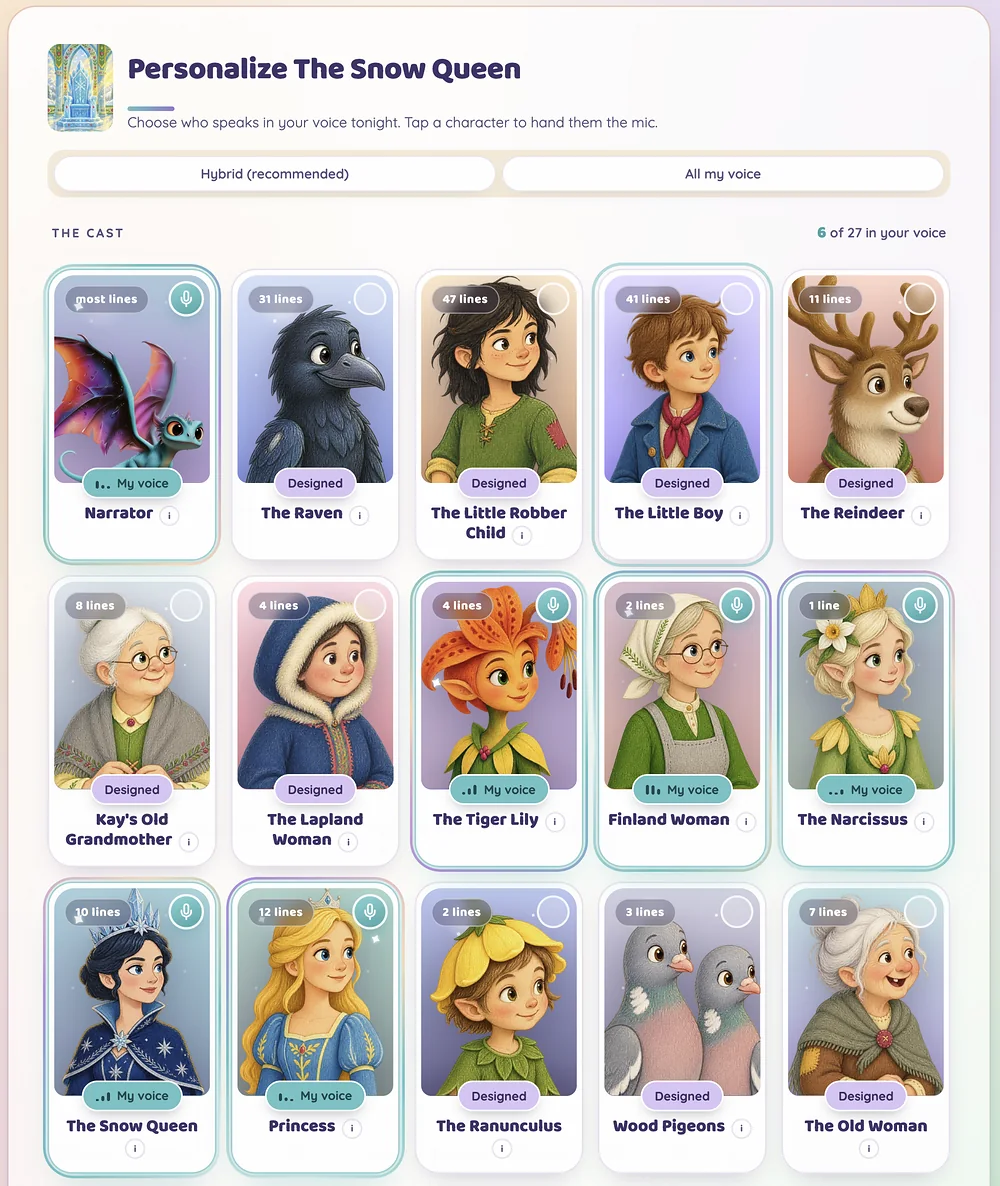
Personalize The Snow Queen: the Hybrid (recommended) and All my voice choices, 6 of its 27 characters in your AI voice, and character cards marked My voice, among them the Narrator, the Tiger Lily, the Snow Queen and the Princess, or Designed.

Paid plan

Give any character your AI voice

On a paid plan, record one short passage, then choose who reads in your AI voice: just the narrator, a few characters or the whole cast. Everyone else keeps their own AI voice.

  1. Hybrid or All my voice Hybrid, the recommended start, gives your AI voice to the narrator. All my voice gives it to the whole cast.
  2. The count so far See how many characters will speak in your AI voice: here, 6 of the 27.
  3. Hand them the mic Tap any character to give them your AI voice, and tap again to give it back.
  4. My voice or Designed My voice marks a character read in your AI voice, and Designed one that keeps the AI voice made for it.
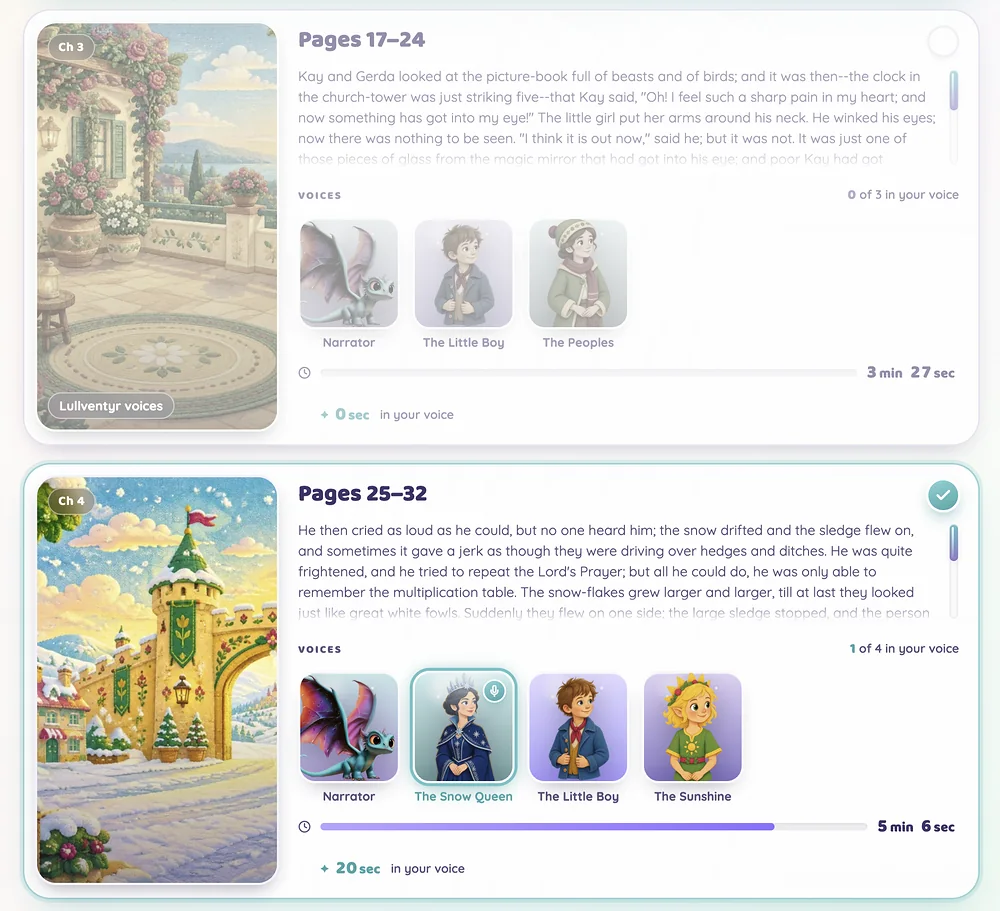
Two chapter cards from the chapter picker for The Snow Queen: chapter 3 left unticked, in the Lullventyr voices, and chapter 4 ticked, with the Snow Queen read in your AI voice for 20 seconds of its 5 minutes 6 seconds.

Paid plan

Choose the chapters to narrate

Then pick the chapters to narrate in your AI voice. Each one shows its picture, how it begins and who speaks in it, so you know exactly what you will hear.

  1. Tick a chapter A ticked chapter is narrated with the voices you picked.
  2. A mic on your voices A mic marks each character read in your AI voice in that chapter.
  3. Only your part counts Under each chapter’s length is the part in your AI voice: only that part uses your plan’s monthly rendering time, and replaying a chapter uses none.
  4. Or keep our voices A chapter you leave unticked keeps our AI voices, marked Lullventyr voices.
How it works

Simple plans

Free

A free preview for adults: five stories a month, read or listened to, with up to 10 minutes of listening a day, narrated by our built-in AI voices. No Story mode.

Paid plans

Unlimited listening to every story in the library in our AI voices, plus the ones you choose narrated in your AI voice — for the narrator or any character — within your plan's monthly rendering time. Story mode included. Monthly, cancel any time.
See plans & pricing

Made for storytime

Story Mode: just the stories

On a paid plan: a stories-only screen behind a PIN you set — nothing to buy, record or change inside. A child may use it only while an adult supervises them. Use your PIN to return to your account.

Care behind every tale

We use automated moderation to check story text and illustrations for potentially harmful content. Flagged content is surfaced to our team, and critical flags must be resolved before a tale can be published. Traditional tales can still include adventure, conflict and big feelings—choose what suits your listeners.

Your voice stays yours

Your recording creates narration for your account, including through specialist voice providers. You can remove your voice in account settings. Our Voice Policy explains retention and deletion.

Read the voice policy

Questions users ask

What is Lullventyr?

Lullventyr reads classic fairy tales and bedtime stories aloud with a cast of AI voices: a voice for every character, a reading that follows the mood of each line, pictures of the places where each chapter happens, and read-along text. On a paid plan, it can also narrate the stories you choose in your AI voice: record a short passage to create it. New narration may require another recording after the reference expires.

Who is Lullventyr for?

Adults. You need to be 18 or older to create an account, record your voice or buy a plan, and we ask your birth month and year before you first record your voice. The free plan is for adults to try Lullventyr. Younger listeners may use it only in Story mode, which comes with a paid plan, on your account, only if you choose to let them, and only while an adult supervises them, on your responsibility.

Terms of Service →
What do I have to record?

One passage, about a minute long, read aloud in a quiet room from your phone or computer. Lullventyr checks the take while you record and tells you if it is too quiet, too noisy or too short. The reference expires after one hour without use.

What happens to my voice recording?

We process your recording through specialist voice providers to create narration for your account. We do not use it to train shared AI models. You can remove your voice in account settings.

Voice & Biometric Data Policy →